
Note
Go to the end to download the full example code.
Third Medium Contact#
This contact method uses a third medium for two solid contact bodies with a a Hessian-
based regularization [2]. First, let’s create sub meshes with bi-quadratic quad cells
for the solid body. All sub meshes are merged by stacking the meshes of the
mesh container into a mesh.
import numpy as np

import felupe as fem

t = 0.1
L = 1
H = 0.5

nt, nL, nH = (2, 10, 4)

a = fem.Rectangle(a=(0, 0), b=(t, t), n=nt)
b = a.translate(move=H - t, axis=1)
c = fem.Rectangle(a=(t, 0), b=(L, t), n=(nL, nt))
d = c.translate(move=H - t, axis=1)
e = fem.Rectangle(a=(0, t), b=(t, H - t), n=(nt, nH))
body = fem.MeshContainer([a, b, c, d, e], merge=True).stack()
body = body.add_midpoints_edges().add_midpoints_faces()
This is repeated for the medium, where two meshes are added to a mesh container. Extra cells are added on the right edge to improve convergence.
Both stacked meshes are added to a top-level mesh container. For each mesh of the container, quad regions and plane-strain vector-fields for the displacements are created. The Neo-Hookean isotropic hyperelastic material formulation from the solid body is also used for the isotropic part of the background material but with scaled down material parameters.
G = 5 / 14
K = 5 / 3
kr = 5e-6
gamma0 = 5e-6

container = fem.MeshContainer([body, medium], merge=True, decimals=6)
regions = [fem.RegionBiQuadraticQuad(m, hess=True) for m in container.meshes]
fields = [fem.FieldPlaneStrain(r, dim=2).as_container() for r in regions]
umats = [
    fem.NeoHookeCompressible(mu=G, lmbda=K),
    fem.NeoHookeCompressible(mu=G * gamma0, lmbda=K * gamma0),
]
solids = [fem.SolidBody(umat, f) for umat, f in zip(umats, fields)]
A top-level plane-strain field is created on a stacked mesh. This field includes all unknowns and is required for the selection of prescribed degrees of freedom as well as for Newton’s method. The left end edge is fixed and the vertical displacement is prescribed on the outermost top-right point.
region = fem.RegionBiQuadraticQuad(container.stack())
field = fem.FieldPlaneStrain(region, dim=2).as_container()

bounds = fem.BoundaryDict(
    fixed=fem.Boundary(field[0], fx=0),
    move=fem.Boundary(field[0], fx=L, fy=H, mode="and", skip=(1, 0)),
)
The so-called HuHu-LuLu-regularization is created by two weak-
forms, which are derived from the regularization
potential, see Eq. (1) [3].
from felupe.math import dddot, dot, hess

laplacian = lambda x: np.einsum("ijj...->i...", x)


@fem.Form(v=fields[1], u=fields[1], kwargs={"kr": 1.0})
def bilinearform():
    def a(v, u, kr):
        Hu = hess(u)
        Hv = hess(v)
        Lu = laplacian(Hu)
        Lv = laplacian(Hv)
        return kr * (dddot(Hu, Hv) - dot(Lu, Lv, mode=(1, 1)) / 2)

    return [a]


@fem.Form(v=fields[1], kwargs={"kr": 1.0})
def linearform():
    u = fields[1][0]

    def L(v, kr):
        Hu = hess(u)[:2, :2, :2]
        Hv = hess(v)
        Lu = laplacian(Hu)
        Lv = laplacian(Hv)
        return kr * (dddot(Hu, Hv) - dot(Lu, Lv, mode=(1, 1)) / 2)

    return [L]


regularization = fem.FormItem(
    bilinearform=bilinearform,
    linearform=linearform,
    kwargs={"kr": kr * K * L**2},
)
The prescribed displacement is ramped up to the maximum value.
The top-level field has to be passed as the x0-argument of the job.
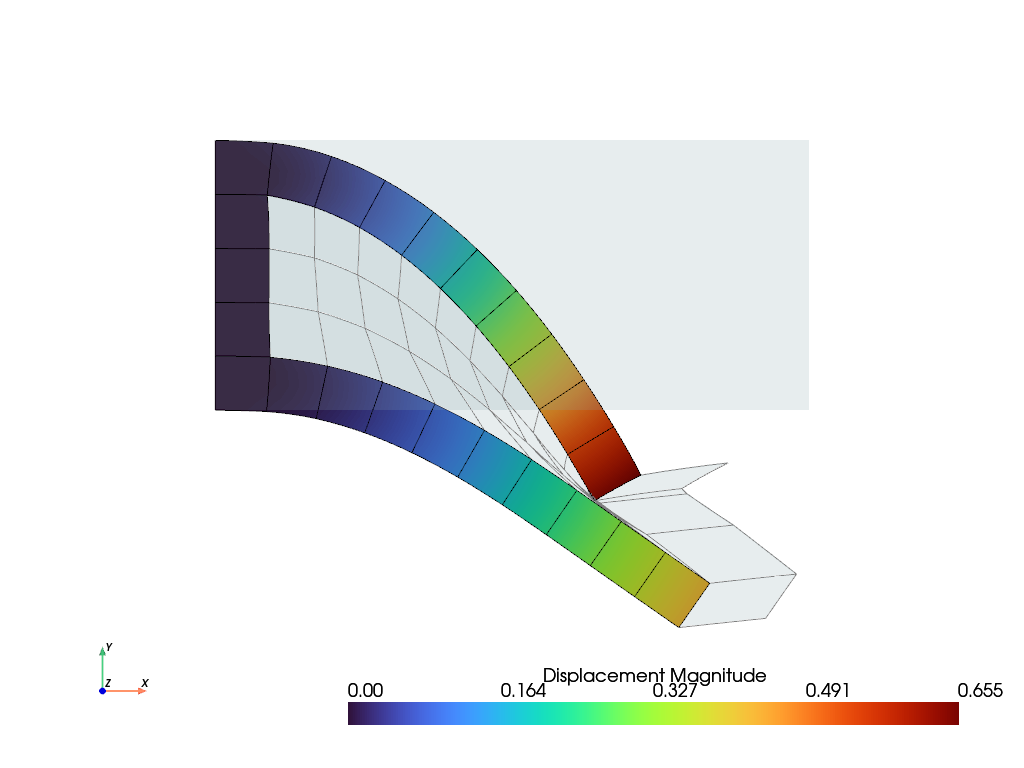
The deformation configuration is plotted.
/home/docs/checkouts/readthedocs.org/user_builds/felupe/envs/stable/lib/python3.12/site-packages/felupe/view/_scene.py:251: PyVistaFutureWarning: The default value of `algorithm` for the filter
`UnstructuredGrid.extract_surface` will change in the future. It currently defaults to
`'dataset_surface'`, but will change to `None`. Explicitly set the `algorithm` keyword to
silence this warning.
  surface = surface.extract_surface(
/home/docs/checkouts/readthedocs.org/user_builds/felupe/envs/stable/lib/python3.12/site-packages/felupe/view/_scene.py:290: PyVistaFutureWarning: The default value of `algorithm` for the filter
`UnstructuredGrid.extract_surface` will change in the future. It currently defaults to
`'dataset_surface'`, but will change to `None`. Explicitly set the `algorithm` keyword to
silence this warning.
  .extract_surface(nonlinear_subdivision=nonlinear_subdivision)
/home/docs/checkouts/readthedocs.org/user_builds/felupe/envs/stable/lib/python3.12/site-packages/felupe/view/_scene.py:251: PyVistaFutureWarning: The default value of `algorithm` for the filter
`UnstructuredGrid.extract_surface` will change in the future. It currently defaults to
`'dataset_surface'`, but will change to `None`. Explicitly set the `algorithm` keyword to
silence this warning.
  surface = surface.extract_surface(
/home/docs/checkouts/readthedocs.org/user_builds/felupe/envs/stable/lib/python3.12/site-packages/felupe/view/_scene.py:290: PyVistaFutureWarning: The default value of `algorithm` for the filter
`UnstructuredGrid.extract_surface` will change in the future. It currently defaults to
`'dataset_surface'`, but will change to `None`. Explicitly set the `algorithm` keyword to
silence this warning.
  .extract_surface(nonlinear_subdivision=nonlinear_subdivision)
References#
Total running time of the script: (0 minutes 2.511 seconds)